Monday, February 19, 2018

Java StringBuilder

https://docs.oracle.com/javase/tutorial/java/data/buffers.html


StringBuilder objects are like String objects, except that they can be modified


StringBuilder Constructors
ConstructorDescription
StringBuilder()Creates an empty string builder with a capacity of 16 (16 empty elements).
StringBuilder(CharSequence cs)Constructs a string builder containing the same characters as the specified CharSequence, plus an extra 16 empty elements trailing the CharSequence.
StringBuilder(int initCapacity)Creates an empty string builder with the specified initial capacity.
StringBuilder(String s)Creates a string builder whose value is initialized by the specified string, plus an extra 16 empty elements trailing the string.

A string builder's length is the number of characters it contains; a string builder's capacity is the number of character spaces that have been allocated.


Length and Capacity Methods
MethodDescription
void setLength(int newLength)Sets the length of the character sequence. If newLength is less than length(), the last characters in the character sequence are truncated. If newLength is greater than length(), null characters are added at the end of the character sequence.
void ensureCapacity(int minCapacity)Ensures that the capacity is at least equal to the specified minimum.


Various StringBuilder Methods
MethodDescription
StringBuilder append(boolean b)
StringBuilder append(char c)
StringBuilder append(char[] str)
StringBuilder append(char[] str, int offset, int len)
StringBuilder append(double d)
StringBuilder append(float f)
StringBuilder append(int i)
StringBuilder append(long lng)
StringBuilder append(Object obj)
StringBuilder append(String s)
Appends the argument to this string builder. The data is converted to a string before the append operation takes place.
StringBuilder delete(int start, int end)
StringBuilder deleteCharAt(int index)
The first method deletes the subsequence from start to end-1 (inclusive) in the StringBuilder's char sequence. The second method deletes the character located at index.
StringBuilder insert(int offset, boolean b)
StringBuilder insert(int offset, char c)
StringBuilder insert(int offset, char[] str)
StringBuilder insert(int index, char[] str, int offset, int len)
StringBuilder insert(int offset, double d)
StringBuilder insert(int offset, float f)
StringBuilder insert(int offset, int i)
StringBuilder insert(int offset, long lng)
StringBuilder insert(int offset, Object obj)
StringBuilder insert(int offset, String s)
Inserts the second argument into the string builder. The first integer argument indicates the index before which the data is to be inserted. The data is converted to a string before the insert operation takes place.
StringBuilder replace(int start, int end, String s)
void setCharAt(int index, char c)
Replaces the specified character(s) in this string builder.
StringBuilder reverse()Reverses the sequence of characters in this string builder.
String toString()Returns a string that contains the character sequence in the builder.

Note: You can use any String method on a StringBuilder object by first converting the string builder to a string with the toString() method of the StringBuilder class. Then convert the string back into a string builder using the StringBuilder(String str) constructor.


Summary of Characters and Strings

Most of the time, if you are using a single character value, you will use the primitive char type. There are times, however, when you need to use a char as an object—for example, as a method argument where an object is expected. The Java programming language provides a wrapper class that "wraps" the char in a Character object for this purpose. An object of type Character contains a single field whose type is char. This Character class also offers a number of useful class (i.e., static) methods for manipulating characters.
Strings are a sequence of characters and are widely used in Java programming. In the Java programming language, strings are objects. The String class has over 60 methods and 13 constructors.
Most commonly, you create a string with a statement like
String s = "Hello world!";
rather than using one of the String constructors.
The String class has many methods to find and retrieve substrings; these can then be easily reassembled into new strings using the + concatenation operator.
The String class also includes a number of utility methods, among them split(), toLowerCase(), toUpperCase(), and valueOf(). The latter method is indispensable in converting user input strings to numbers. The Number subclasses also have methods for converting strings to numbers and vice versa.
In addition to the String class, there is also a StringBuilder class. Working with StringBuilder objects can sometimes be more efficient than working with strings. The StringBuilder class offers a few methods that can be useful for strings, among them reverse(). In general, however, the String class has a wider variety of methods.
A string can be converted to a string builder using a StringBuilder constructor. A string builder can be converted to a string with the toString() method.


Autoboxing and Unboxing

Autoboxing is the automatic conversion that the Java compiler makes between the primitive types and their corresponding object wrapper classes. For example, converting an int to an Integer, a double to a Double, and so on. If the conversion goes the other way, this is called unboxing.


Java String

https://docs.oracle.com/javase/tutorial/java/data/strings.html
https://docs.oracle.com/javase/tutorial/java/data/manipstrings.html

Creating Strings

String greeting = "Hello world!";
char[] helloArray = { 'h', 'e', 'l', 'l', 'o', '.' };
String helloString = new String(helloArray);

String Length

String palindrome = "Dot saw I was Tod";
int len = palindrome.length();

Concatenating Strings

string1.concat(string2);
"Hello," + " world" + "!

Note: The Java programming language does not permit literal strings to span lines in source files, so you must use the + concatenation operator at the end of each line in a multi-line string. For example:
String quote = 
    "Now is the time for all good " +
    "men to come to the aid of their country.";

Creating Format Strings

Using String's static format() method allows you to create a formatted string that you can reuse, as opposed to a one-time print statement. For example

String fs;
fs = String.format("The value of the float " +
                   "variable is %f, while " +
                   "the value of the " + 
                   "integer variable is %d, " +
                   " and the string is %s",
                   floatVar, intVar, stringVar);
System.out.println(fs);


Converting Strings to Numbers

float a = (Float.valueOf("999")).floatValue(); 

Converting Numbers to Strings

String s = Double.toString(888.33);


Getting Characters and Substrings by Index

String anotherPalindrome = "Niagara. O roar again!"; 
char aChar = anotherPalindrome.charAt(9);


Use the charAt method to get a character at a particular index.


String anotherPalindrome = "Niagara. O roar again!"; 
String roar = anotherPalindrome.substring(11, 15); 


Use the substring method to get part of a string.
The substring Methods in the String Class
MethodDescription
String substring(int beginIndex, int endIndex)Returns a new string that is a substring of this string. The substring begins at the specified beginIndex and extends to the character at index endIndex - 1.
String substring(int beginIndex)Returns a new string that is a substring of this string. The integer argument specifies the index of the first character. Here, the returned substring extends to the end of the original string.


Other Methods for Manipulating Strings

Here are several other String methods for manipulating strings:


Other Methods in the String Class for Manipulating Strings
MethodDescription
String[] split(String regex)
String[] split(String regex, int limit)
Searches for a match as specified by the string argument (which contains a regular expression) and splits this string into an array of strings accordingly. The optional integer argument specifies the maximum size of the returned array. Regular expressions are covered in the lesson titled "Regular Expressions."
CharSequence subSequence(int beginIndex, int endIndex)Returns a new character sequence constructed from beginIndex index up until endIndex - 1.
String trim()Returns a copy of this string with leading and trailing white space removed.
String toLowerCase()
String toUpperCase()
Returns a copy of this string converted to lowercase or uppercase. If no conversions are necessary, these methods return the original string.


Searching for Characters and Substrings in a String

The Search Methods in the String Class
MethodDescription
int indexOf(int ch)
int lastIndexOf(int ch)
Returns the index of the first (last) occurrence of the specified character.
int indexOf(int ch, int fromIndex)
int lastIndexOf(int ch, int fromIndex)
Returns the index of the first (last) occurrence of the specified character, searching forward (backward) from the specified index.
int indexOf(String str)
int lastIndexOf(String str)
Returns the index of the first (last) occurrence of the specified substring.
int indexOf(String str, int fromIndex)
int lastIndexOf(String str, int fromIndex)
Returns the index of the first (last) occurrence of the specified substring, searching forward (backward) from the specified index.
boolean contains(CharSequence s)Returns true if the string contains the specified character sequence.

Note: CharSequence is an interface that is implemented by the String class. Therefore, you can use a string as an argument for the contains() method.


Replacing Characters and Substrings into a String

Methods in the String Class for Manipulating Strings
MethodDescription
String replace(char oldChar, char newChar)Returns a new string resulting from replacing all occurrences of oldChar in this string with newChar.
String replace(CharSequence target, CharSequence replacement)Replaces each substring of this string that matches the literal target sequence with the specified literal replacement sequence.
String replaceAll(String regex, String replacement)Replaces each substring of this string that matches the given regular expression with the given replacement.
String replaceFirst(String regex, String replacement)Replaces the first substring of this string that matches the given regular expression with the given replacement.


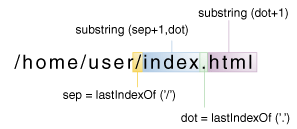
The use of lastIndexOf and substring in the extension method in the Filename class.

Comparing Strings and Portions of Strings

Methods for Comparing Strings
MethodDescription
boolean endsWith(String suffix)
boolean startsWith(String prefix)
Returns true if this string ends with or begins with the substring specified as an argument to the method.
boolean startsWith(String prefix, int offset)Considers the string beginning at the index offset, and returns true if it begins with the substring specified as an argument.
int compareTo(String anotherString)Compares two strings lexicographically. Returns an integer indicating whether this string is greater than (result is > 0), equal to (result is = 0), or less than (result is < 0) the argument.
int compareToIgnoreCase(String str)Compares two strings lexicographically, ignoring differences in case. Returns an integer indicating whether this string is greater than (result is > 0), equal to (result is = 0), or less than (result is < 0) the argument.
boolean equals(Object anObject)Returns true if and only if the argument is a String object that represents the same sequence of characters as this object.
boolean equalsIgnoreCase(String anotherString)Returns true if and only if the argument is a String object that represents the same sequence of characters as this object, ignoring differences in case.
boolean regionMatches(int toffset, String other, int ooffset, int len)Tests whether the specified region of this string matches the specified region of the String argument.Region is of length len and begins at the index toffset for this string and ooffset for the other string.
boolean regionMatches(boolean ignoreCase, int toffset, String other, int ooffset, int len)Tests whether the specified region of this string matches the specified region of the String argument.Region is of length len and begins at the index toffset for this string and ooffset for the other string.
The boolean argument indicates whether case should be ignored; if true, case is ignored when comparing characters.
boolean matches(String regex)Tests whether this string matches the specified regular expression. Regular expressions are discussed in the lesson titled "Regular Expressions."


Java Characters

https://docs.oracle.com/javase/tutorial/java/data/characters.html

Java provides a wrapper class that "wraps" the char in a Character object for this purpose. An object of type Character contains a single field, whose type is char. 

char ch = 'a'; 
// Unicode for uppercase Greek omega character
char uniChar = '\u03A9';
// an array of chars
char[] charArray = { 'a', 'b', 'c', 'd', 'e' };

Note: The Character class is immutable, so that once it is created, a Character object cannot be changed.


Character ch = new Character('a');


Useful Methods in the Character Class
MethodDescription
boolean isLetter(char ch)
boolean isDigit(char ch)
Determines whether the specified char value is a letter or a digit, respectively.
boolean isWhitespace(char ch)Determines whether the specified char value is white space.
boolean isUpperCase(char ch)
boolean isLowerCase(char ch)
Determines whether the specified char value is uppercase or lowercase, respectively.
char toUpperCase(char ch)
char toLowerCase(char ch)
Returns the uppercase or lowercase form of the specified char value.
toString(char ch)Returns a String object representing the specified character value — that is, a one-character string.


Escape Sequences
Escape SequenceDescription
\tInsert a tab in the text at this point.
\bInsert a backspace in the text at this point.
\nInsert a newline in the text at this point.
\rInsert a carriage return in the text at this point.
\fInsert a formfeed in the text at this point.
\'Insert a single quote character in the text at this point.
\"Insert a double quote character in the text at this point.
\\Insert a backslash character in the text at this point.


Throw exceptions


https://www.cnblogs.com/shihuc/p/5201905.html
http://blog.csdn.net/qq_14982047/article/details/50989761


这里写图片描述


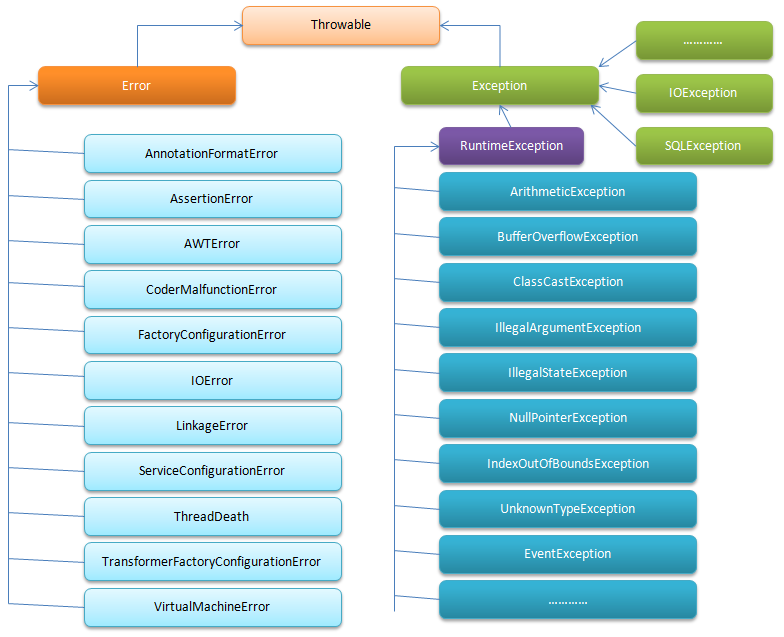
Checked vs unchecked

Error happens in JVM
Checked Exception: checked during compiling time

                 +-----------+
                 | Throwable |
                 +-----------+
                  /         \
                 /           \
          +-------+          +-----------+
          | Error |          | Exception |
          +-------+          +-----------+
           /  |  \           / | \        \
          \________/       \______/         \
                                        +------------------+
          unchecked        checked      | RuntimeException |
                                        +------------------+
                                         /   |    |      \
                                        \_________________/
                        
                                            unchecked

Exceptions in Constructor:
https://stackoverflow.com/questions/6086334/is-it-good-practice-to-make-the-constructor-throw-an-exception

Throwing exceptions in a constructor is not bad practice. In fact, it is the only reasonable way for a constructor to indicate that there is a problem; e.g. that the parameters are invalid.
However explicitly declaring or throwing java.lang.Exception is almost always bad practice.
You should pick an exception class that matches the exceptional condition that has occurred. If you throw Exception it is difficult for the caller to separate this exception from any number of other possible declared and undeclared exceptions. This makes error recovery difficult, and if the caller chooses to propagate the Exception, the problem just spreads.

Someone suggested using assert for checking arguments. The problem with this is that checking of assert assertions can be turned on and off via a JVM command-line setting. Using assertions to check internal invariants is OK, but using them to implement argument checking that is specified in your javadoc is not a good idea ... because it means your method will only strictly implement the specification when assertion checking is enabled.
The second problem with assert is that if an assertion fails, then AssertionError will be thrown, and received wisdom is that it is a bad idea to attempt to catch Error and any of its subtypes.

How https works?


https://tiptopsecurity.com/how-does-https-work-ssl-tls-explained/
https://www.nginx.com/blog/nginx-https-101-ssl-basics-getting-started/
https://www.hi-linux.com/posts/21572.html
https://zhuanlan.zhihu.com/p/25587986
https://www.jianshu.com/p/51cc23843756
https://github.com/youngwind/blog/issues/108
https://www.jianshu.com/p/81ed6c02012a


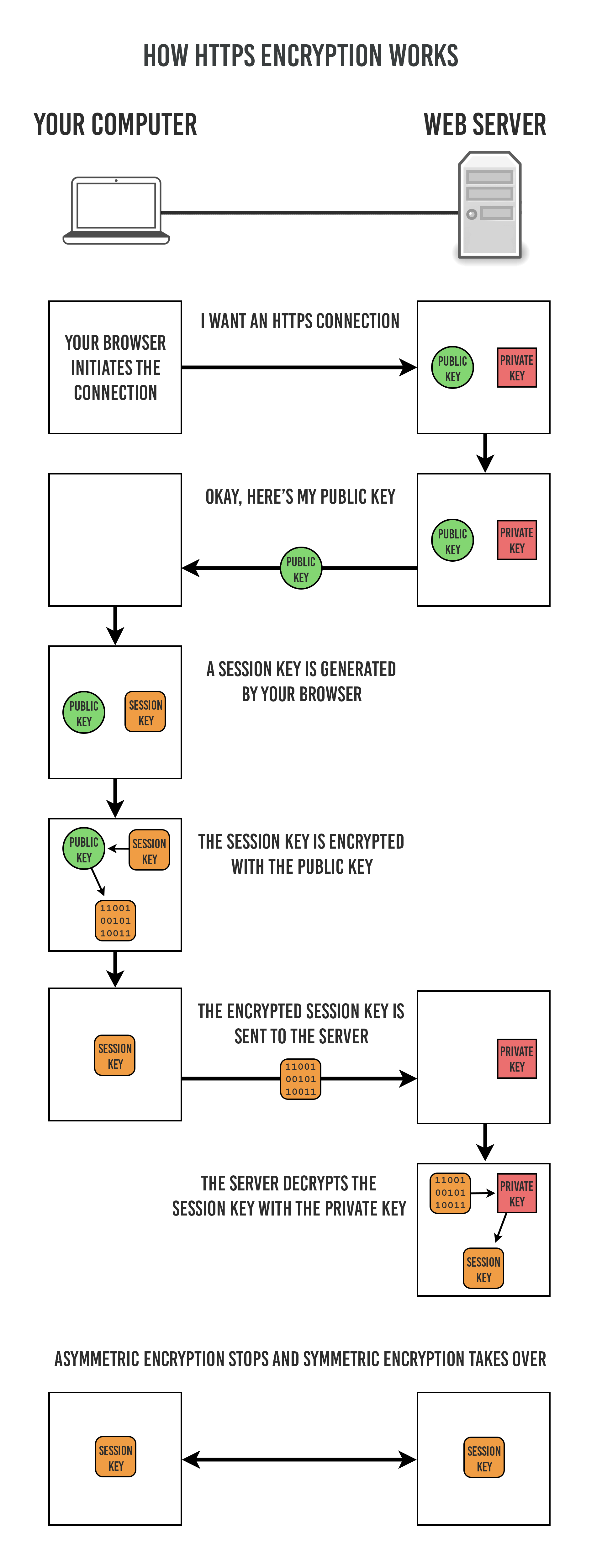
How HTTPS Works


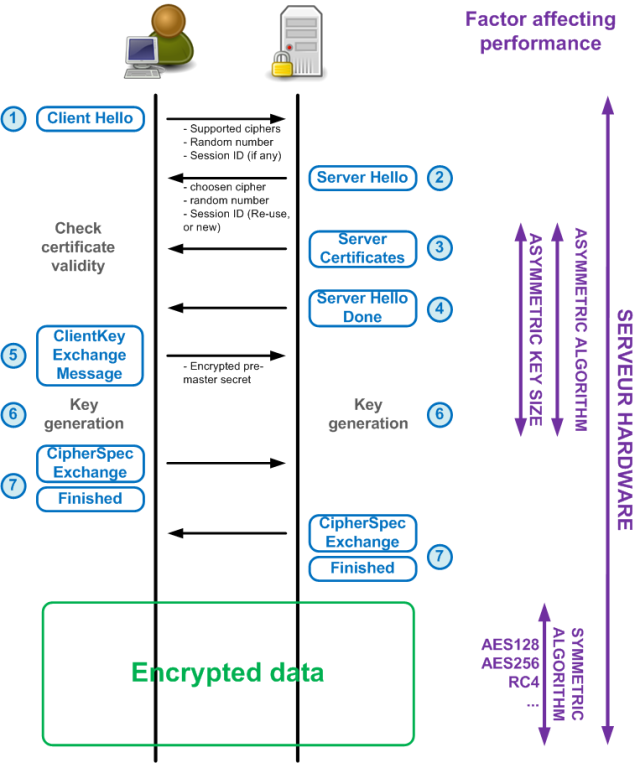
Here’s how it works in more detail:


  1. Your browser reaches out to the website server and requests a connection.
  2. The server sends you its public key. It keeps its private key a secret.
  3. Your browser generates a third key called a session key.
  4. The session key is encrypted by your computer using the public key you got from the server
  5. The encrypted session key is then shared with the server.
  6. The server decrypts the session key that it received from you using the secret private key. Now both ends have the session key that your computer generated.
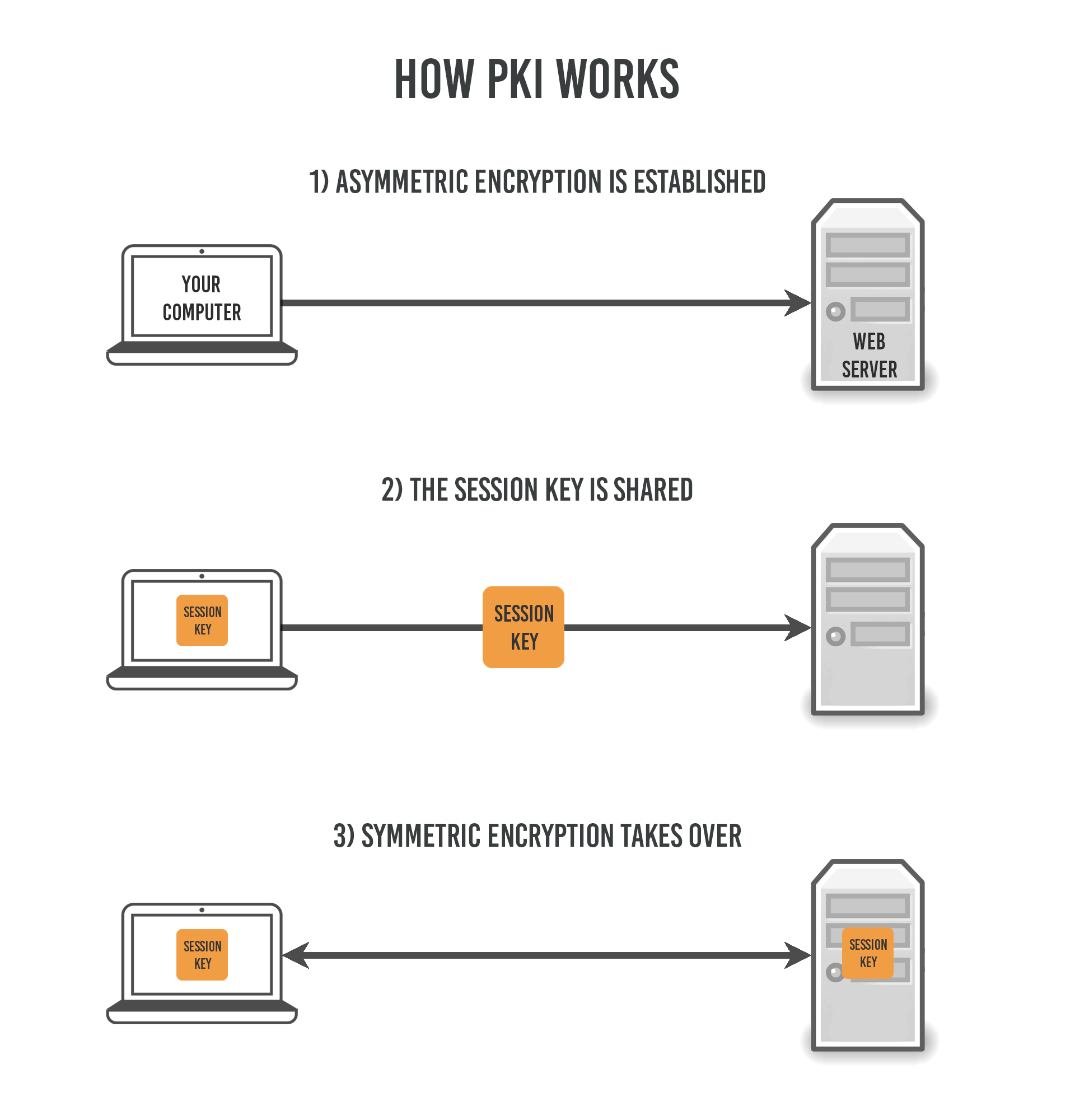
  7. The public key encryption is terminated and replaced with symmetric encryption.
  8. Now you are in a session with the server using only symmetric encryption, and that’s how it remains until you leave the website.
At the end both client and server share the symmetric key.


 How PKI Works
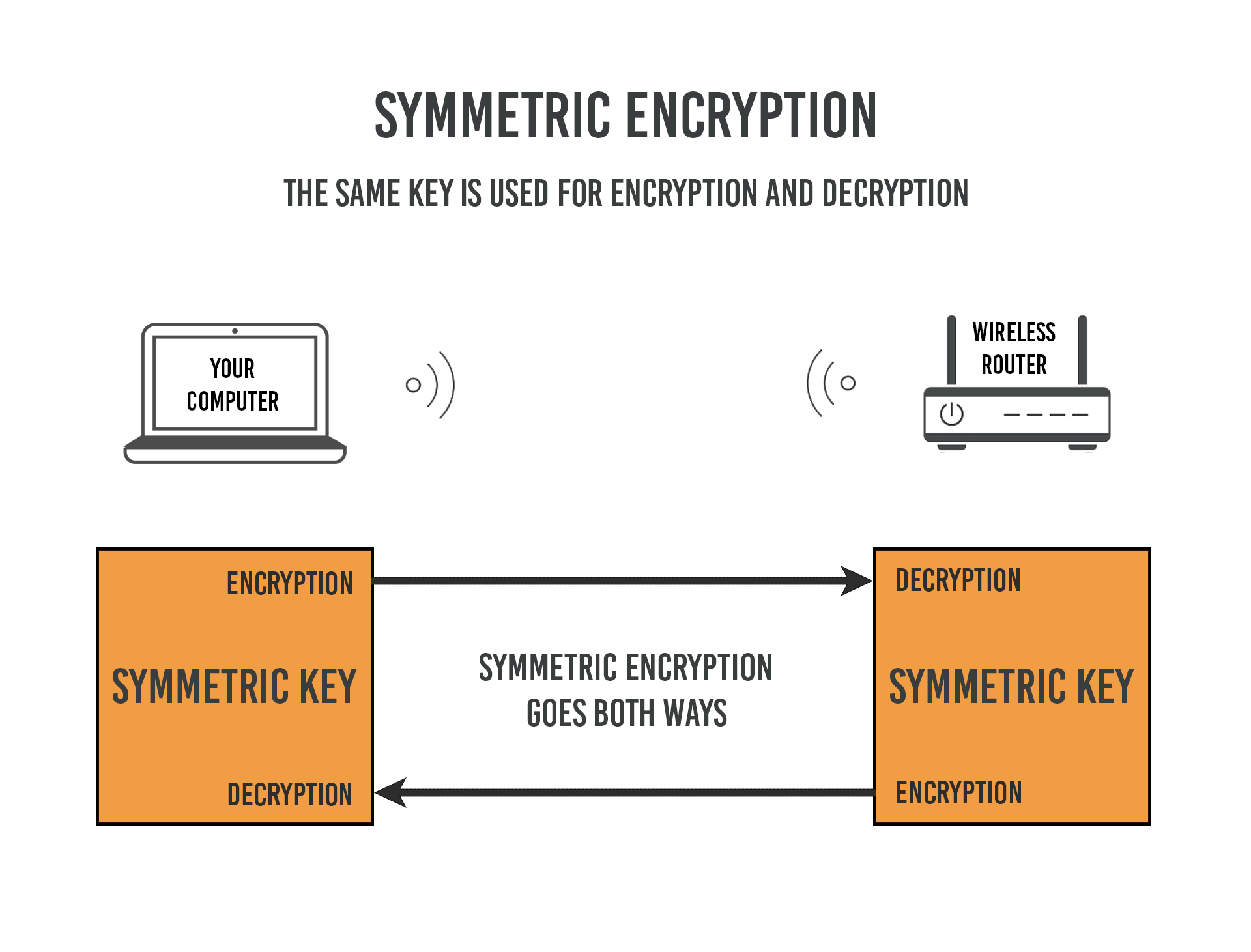
Symmetric encryption image


Sunday, February 18, 2018

Java Number Class


https://docs.oracle.com/javase/tutorial/java/data/numberclasses.html
https://examples.javacodegeeks.com/core-java/apache/commons/lang3/math-lang3/numberutils/org-apache-commons-lang3-math-numberutils-example/
https://docs.oracle.com/javase/tutorial/java/data/beyondmath.html
https://stackoverflow.com/questions/18442503/java-isnan-how-it-works


Numbers Classes


Three reasons that you might use a Number object rather than a primitive:
  1. As an argument of a method that expects an object (often used when manipulating collections of numbers).
  2. To use constants defined by the class, such as MIN_VALUE and MAX_VALUE, that provide the upper and lower bounds of the data type.
  3. To use class methods for converting values to and from other primitive types, for converting to and from strings, and for converting between number systems (decimal, octal, hexadecimal, binary).
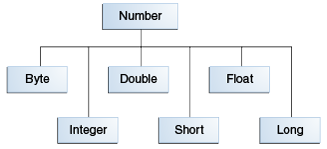
The class hierarchy of Number.


Methods Implemented by all Subclasses of Number
MethodDescription
byte byteValue()
short shortValue()
int intValue()
long longValue()
float floatValue()
double doubleValue()
Converts the value of this Number object to the primitive data type returned.
int compareTo(Byte anotherByte)
int compareTo(Double anotherDouble)
int compareTo(Float anotherFloat)
int compareTo(Integer anotherInteger)
int compareTo(Long anotherLong)
int compareTo(Short anotherShort)
Compares this Number object to the argument.
boolean equals(Object obj)Determines whether this number object is equal to the argument.
The methods return true if the argument is not null and is an object of the same type and with the same numeric value.
There are some extra requirements for Double and Float objects that are described in the Java API documentation.

Each Number class contains other methods that are useful for converting numbers to and from strings and for converting between number systems. The following table lists these methods in the Integer class. Methods for the other Number subclasses are similar:

Conversion Methods, Integer Class
MethodDescription
static Integer decode(String s)Decodes a string into an integer. Can accept string representations of decimal, octal, or hexadecimal numbers as input.
static int parseInt(String s)Returns an integer (decimal only).
static int parseInt(String s, int radix)Returns an integer, given a string representation of decimal, binary, octal, or hexadecimal (radix equals 10, 2, 8, or 16 respectively) numbers as input.
String toString()Returns a String object representing the value of this Integer.
static String toString(int i)Returns a String object representing the specified integer.
static Integer valueOf(int i)Returns an Integer object holding the value of the specified primitive.
static Integer valueOf(String s)Returns an Integer object holding the value of the specified string representation.
static Integer valueOf(String s, int radix)Returns an Integer object holding the integer value of the specified string representation, parsed with the value of radix. For example, if s = "333" and radix = 8, the method returns the base-ten integer equivalent of the octal number 333.


Autoboxing and unboxing lets developers write cleaner code, making it easier to read. The following table lists the primitive types and their corresponding wrapper classes, which are used by the Java compiler for autoboxing and unboxing:


Primitive typeWrapper class
booleanBoolean
byteByte
charCharacter
floatFloat
intInteger
longLong
shortShort
doubleDouble


A Java NumberFormatException usually occurs when you try to do something like convert a String to a numeric value, like an int, float, double, long, etc.

// String str = "123456789"; this will throw NumberFormatException
String str = "123";
Integer i = Integer.parseInt(str);
Byte b = Byte.parseByte(str);
Double d = Double.parseDouble(str);
Float f = Float.parseFloat(str);
Long l = Long.parseLong(str);
Short s = Short.parseShort(str);

System.out.println("str = " + str);
System.out.println("i = " + i);
System.out.println("b = " + b);
System.out.println("d = " + d);
System.out.println("f = " + f);
System.out.println("l = " + l);
System.out.println("s = " + s);


We can use NumberUtils library to solve the issue:


1<groupId>org.apache.commons</groupId>
2<artifactId>commons-lang3</artifactId>
3<version>3.3.2</version>

Integer i = NumberUtils.createInteger(str);
Byte b = NumberUtils.toByte(str);
Double d = NumberUtils.createDouble(str);
Float f = NumberUtils.createFloat(str);
Long l = NumberUtils.createLong(str);
Short s = NumberUtils.toShort(str);


Formatting Numeric Print Output

The printf and format Methods


The java.io package includes a PrintStream class that has two formatting methods that you can use to replace print and println. These methods, format and printf, are equivalent to one another. The familiar System.out that you have been using happens to be a PrintStream object, so you can invoke PrintStream methods on System.out. Thus, you can use format or printf anywhere in your code 
where you have previously been using print or println. For example,

System.out.format(.....);

The syntax for these two java.io.PrintStream methods is the same:

public PrintStream format(String format, Object... args)

where format is a string that specifies the formatting to be used and args is a list of the variables to be printed using that formatting. A simple example would be

System.out.format("The value of " + "the float variable is " +
     "%f, while the value of the " + "integer variable is %d, " +
     "and the string is %s", floatVar, intVar, stringVar); 


Converters and Flags Used in TestFormat.java
ConverterFlagExplanation
d A decimal integer.
f A float.
n A new line character appropriate to the platform running the application. You should always use %n, rather than \n.
tB A date & time conversion—locale-specific full name of month.
td, te A date & time conversion—2-digit day of month. td has leading zeroes as needed, te does not.
ty, tY A date & time conversion—ty = 2-digit year, tY = 4-digit year.
tl A date & time conversion—hour in 12-hour clock.
tM A date & time conversion—minutes in 2 digits, with leading zeroes as necessary.
tp A date & time conversion—locale-specific am/pm (lower case).
tm A date & time conversion—months in 2 digits, with leading zeroes as necessary.
tD A date & time conversion—date as %tm%td%ty
 08Eight characters in width, with leading zeroes as necessary.
 +Includes sign, whether positive or negative.
 ,Includes locale-specific grouping characters.
 -Left-justified..
 .3Three places after decimal point.
 10.3Ten characters in width, right justified, with three places after decimal point.


import java.util.Calendar;
import java.util.Locale;

public class TestFormat {
    
    public static void main(String[] args) {
      long n = 461012;
      System.out.format("%d%n", n);      //  -->  "461012"
      System.out.format("%08d%n", n);    //  -->  "00461012"
      System.out.format("%+8d%n", n);    //  -->  " +461012"
      System.out.format("%,8d%n", n);    // -->  " 461,012"
      System.out.format("%+,8d%n%n", n); //  -->  "+461,012"
      
      double pi = Math.PI;

      System.out.format("%f%n", pi);       // -->  "3.141593"
      System.out.format("%.3f%n", pi);     // -->  "3.142"
      System.out.format("%10.3f%n", pi);   // -->  "     3.142"
      System.out.format("%-10.3f%n", pi);  // -->  "3.142"
      System.out.format(Locale.FRANCE,
                        "%-10.4f%n%n", pi); // -->  "3,1416"

      Calendar c = Calendar.getInstance();
      System.out.format("%tB %te, %tY%n", c, c, c); // -->  "May 29, 2006"

      System.out.format("%tl:%tM %tp%n", c, c, c);  // -->  "2:34 am"

      System.out.format("%tD%n", c);    // -->  "05/29/06"
    }
}


The DecimalFormat Class

You can use the java.text.DecimalFormat class to control the display of leading and trailing zeros, prefixes and suffixes, grouping (thousands) separators, and the decimal separator. DecimalFormatoffers a great deal of flexibility in the formatting of numbers, but it can make your code more complex.

DecimalFormat.java Output
ValuePatternOutputExplanation
123456.789###,###.###123,456.789The pound sign (#) denotes a digit, the comma is a placeholder for the grouping separator, and the period is a placeholder for the decimal separator.
123456.789###.##123456.79The value has three digits to the right of the decimal point, but the pattern has only two. The format method handles this by rounding up.
123.78000000.000000123.780The pattern specifies leading and trailing zeros, because the 0 character is used instead of the pound sign (#).
12345.67$###,###.###$12,345.67The first character in the pattern is the dollar sign ($). Note that it immediately precedes the leftmost digit in the formatted output.


import java.text.*;

public class DecimalFormatDemo {

   static public void customFormat(String pattern, double value ) {
      DecimalFormat myFormatter = new DecimalFormat(pattern);
      String output = myFormatter.format(value);
      System.out.println(value + "  " + pattern + "  " + output);
   }

   static public void main(String[] args) {

      customFormat("###,###.###", 123456.789);
      customFormat("###.##", 123456.789);
      customFormat("000000.000", 123.78);
      customFormat("$###,###.###", 12345.67);  
   }
}

The output is:
123456.789  ###,###.###  123,456.789
123456.789  ###.##  123456.79
123.78  000000.000  000123.780
12345.67  $###,###.###  $12,345.67


Beyond Basic Arithmetic


The methods in the Math class are all static, so you call them directly from the class, like this:
Math.cos(angle);


Constants and Basic Methods

  • Math.E, which is the base of natural logarithms, and
  • Math.PI, which is the ratio of the circumference of a circle to its diameter.

Basic Math Methods
MethodDescription
double abs(double d)
float abs(float f)
int abs(int i)
long abs(long lng)
Returns the absolute value of the argument.
double ceil(double d)Returns the smallest integer that is greater than or equal to the argument. Returned as a double.
double floor(double d)Returns the largest integer that is less than or equal to the argument. Returned as a double.
double rint(double d)Returns the integer that is closest in value to the argument. Returned as a double.
long round(double d)
int round(float f)
Returns the closest long or int, as indicated by the method's return type, to the argument.
double min(double arg1, double arg2)
float min(float arg1, float arg2)
int min(int arg1, int arg2)
long min(long arg1, long arg2)
Returns the smaller of the two arguments.
double max(double arg1, double arg2)
float max(float arg1, float arg2)
int max(int arg1, int arg2)
long max(long arg1, long arg2)
Returns the larger of the two arguments.


Exponential and Logarithmic Methods
MethodDescription
double exp(double d)Returns the base of the natural logarithms, e, to the power of the argument.
double log(double d)Returns the natural logarithm of the argument.
double pow(double base, double exponent)Returns the value of the first argument raised to the power of the second argument.
double sqrt(double d)Returns the square root of the argument.


Trigonometric Methods
MethodDescription
double sin(double d)Returns the sine of the specified double value.
double cos(double d)Returns the cosine of the specified double value.
double tan(double d)Returns the tangent of the specified double value.
double asin(double d)Returns the arcsine of the specified double value.
double acos(double d)Returns the arccosine of the specified double value.
double atan(double d)Returns the arctangent of the specified double value.
double atan2(double y, double x)Converts rectangular coordinates (x, y) to polar coordinate (r, theta) and returns theta.
double toDegrees(double d)
double toRadians(double d)
Converts the argument to degrees or radians.


Random Numbers

The random() method returns a pseudo-randomly selected number between 0.0 and 1.0. The range includes 0.0 but not 1.0. In other words: 0.0 <= Math.random() < 1.0. To get a number in a different range, you can perform arithmetic on the value returned by the random method.

For example, to generate an integer between 0 and 9, you would write:

int number = (int)(Math.random() * 10);

By multiplying the value by 10, the range of possible values becomes 0.0 <= number < 10.0.

Using Math.random works well when you need to generate a single random number. If you need to generate a series of random numbers, you should create an instance of java.util.Random and invoke methods on that object to generate numbers.


Summary of Numbers


  • You use one of the wrapper classes – Byte, Double, Float, Integer, Long, or Short – to wrap a number of primitive type in an object. The Java compiler automatically wraps (boxes) primitives for you when necessary and unboxes them, again when necessary.
  • The Number classes include constants and useful class methods. The MIN_VALUE and MAX_VALUE constants contain the smallest and largest values that can be contained by an object of that type. The byteValue, shortValue, and similar methods convert one numeric type to another. The valueOf method converts a string to a number, and the toString method converts a number to a string.
  • To format a string containing numbers for output, you can use the printf() or format() methods in the PrintStream class. Alternatively, you can use the NumberFormat class to customize numerical formats using patterns.
  • The Math class contains a variety of class methods for performing mathematical functions, including exponential, logarithmic, and trigonometric methods. Math also includes basic arithmetic functions, such as absolute value and rounding, and a method, random(), for generating random numbers.


The followings both will output true:
System.out.println(Float.isNaN(0.0f / 0.0f));  
System.out.println(Double.isNaN(Math.sqrt(-1)));

Quiz

  1. Use the API documentation to find the answers to the following questions:
    1. Question: What Integer method can you use to convert an int into a string that expresses the number in hexadecimal? For example, what method converts the integer 65 into the string "41"?
      Answer: toHexString
    2. Question:What Integer method would you use to convert a string expressed in base 5 into the equivalent int? For example, how would you convert the string "230" into the integer value 65? Show the code you would use to accomplish this task.
      Answer: valueOf. Here's how:
      String base5String = "230";
      int result = Integer.valueOf(base5String, 5);
      
    3. Question: What Double method can you use to detect whether a floating-point number has the special value Not a Number (NaN)?
      Answer: isNaN
  2. Question: What is the value of the following expression, and why?
    Integer.valueOf(1).equals(Long.valueOf(1))
    
    Answer: False. The two objects (the Integer and the Long) have different types.



java special for collection size, array size, and string size

Size: For Collections (eg: Map, List, etc ): usually it use collection.size(), eg         Map<Character, Integer> map ...